
This is the second part in a series of blog posts regarding the Relyence API. If you’re new to the Relyence API, we strongly recommend checking out the first part of this series here.
The Relyence API empowers you to seamlessly connect your tools and processes to your Relyence environment. Whether you want to automate repetitive tasks, retrieve data for reporting, or build custom integrations, the API provides secure, programmatic access to your reliability data. In this post, we’ll walk through authentication, making your first requests, and interpreting responses using tools like Postman along with beginner-friendly code examples to help you get started.
Key Relyence API Concepts
If you’re new to working with APIs, understanding a few core concepts will make it much easier to work with the Relyence API. Below is a brief overview of key terms you’ll encounter when making requests.
- Endpoint: This is the specific URL where you send your requests to. Each endpoint returns targeted information. For example, the /analyses” endpoint in the Relyence API provides a comprehensive list of analyses associated with the user, along with relevant details for each.
- Method: This refers to the type of action you are performing with your API call. The Relyence API generally categorizes its calls into four methods:
- GET: Retrieves a record.
- POST: Inserts a new record.
- PUT: Updates an existing record.
- DELETE: Deletes a record.
- Request Header: This component contains key-value pairs that provide crucial information about your request. In the Relyence API, the Authorization key is required, with either the user’s API Key or Bearer Token as the value.
- Request Body: This is the data you are inserting, updating, or otherwise manipulating. For example, in POST methods in the Relyence API, the request body typically includes the data you wish to add to analysis or subsystem.
- Parameters: These are additional variables attached to your API call that offer specific instructions for data access. Many calls in the Relyence API require identifiers such as the analysis ID or subsystem ID to specify the exact data you want to access.
- Response: This is the information returned from your API call. For example, if your call was a GET method, the response will contain all the details associated with the requested record.
Getting Started with the Relyence API
To unlock the full functionality of the Relyence API, you first need your unique Relyence API Key. This key grants you access to the data contained in your Relyence analyses.
Before you begin, ensure you have permission to generate an API Key. These permissions are managed by your Relyence Administrator.
Generating Your Relyence API Key
To begin, log in to your Relyence account using your standard credentials. Close any dialogs that may have appeared when you logged in and click your name in the upper right corner. In the dropdown menu that appears, click About Relyence, bringing up the About Relyence dialog.
In the bottom left corner, click Generate Relyence API Key, bringing up the Generate API Key dialog box.
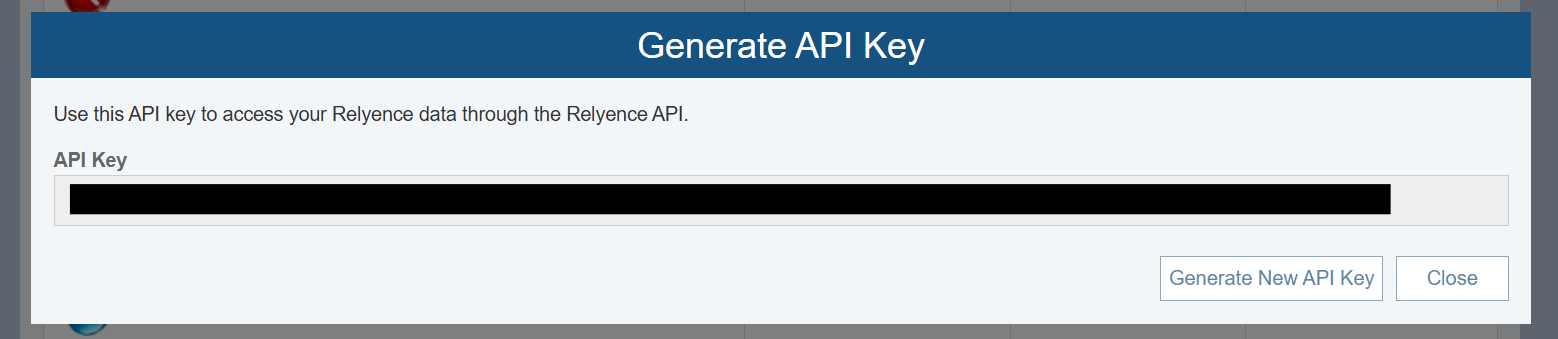
The first time you use this feature, the API Key field will show <No API Key Assigned>. Click the Generate API Key button to generate your unique Relyence API Key. Once generated, your API Key will be displayed and can be copied for use in API requests. Please note that if you generate a new key, any existing key will be invalidated.
Generating Your Bearer Token
To utilize the capabilities of the Relyence API, you must first generate a Bearer Token using your Relyence API Key. Bearer Tokens are valid for 30 minutes. Follow these steps to obtain your token:
- Make a GET Request to the /token Endpoint: Using your preferred tool (such as Postman), send a GET request to the /token endpoint to retrieve the token information required.Format your request as follows, replacing the placeholders in italics with your Relyence credentials and API Key:
Header:
- Authorization: Basic <Your API Key>
Body:
- grant_type: password
- username: <Relyence Username>
- password: <Relyence Password>
- Receive Your Bearer Token: If your request is successful, the API will return a Bearer Token that is used to authenticate API requests..
- Renew Your Token: After 30 minutes, you will need to generate a new Bearer Token to continue making requests to the Relyence API.
By following these steps, you can easily obtain and manage your Bearer Token, ensuring seamless access to the powerful functionalities of the Relyence API.
Using Your Bearer Token in Requests
Now that you have successfully obtained your Bearer Token, you can begin making authenticated requests to the Relyence API. This token is essential for securely accessing the various features of the Relyence API.
For all subsequent API calls, ensure that your request header includes the following format:
Header:
- Authorization: Bearer <Your Bearer Token>
Example Request: Retrieve Subsystems
Let’s walk through a typical API call using the Relyence API through Postman, a popular tool designed for making API requests. In this example, we will demonstrate how to retrieve information about all the subsystems associated with a specific analysis ID.
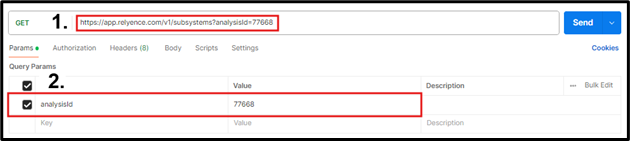
- Define the Endpoint: To retrieve the details of subsystems, we will use the /subsystems endpoint, which is appended to the URL for accessing Relyence. For cloud-based users, the full request URL will begin with “https://app.relyence.com/.” If you are using the Relyence on-premise solution, simply use the appropriate URL for your Relyence access followed by /v1/subsystems.
- Add Required Parameters: In the Parameters section, we will specify the key analysisId with the value “77668,” which represents the analysis ID from which we want to obtain the subsystems. If you’re unsure of your analysis ID, first make a GET request to the /analyses endpoint to retrieve this information.
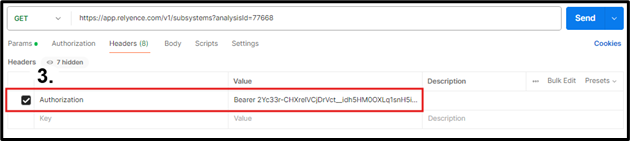
- Include Authorization Header: In the Headers section, include the Authorization key with the value “Bearer <Bearer Token>”. You can obtain your Bearer token by making a request to the /token endpoint (refer to the Getting Started with the Relyence API section for detailed instructions).
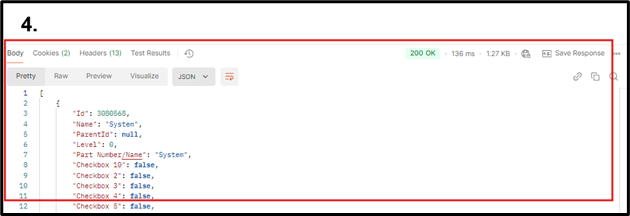
- Send the Request and Review the Response: Once you send the Relyence API call, you should receive a response code of 200 OK, along with the details of the subsystems related to your requested analysis.
Troubleshooting API ErrorsWhen working with the Relyence API, you may occasionally encounter unexpected responses, often indicated by error codes such as 400, 401, or 404. These indicate yourrequest could not be completed as submitted.. Below are common error codes and recommended troubleshooting steps.to help you resolve these issues effectively.
- 400 Bad Request, “Error: Invalid_Client”: Verify that the Authorization header is correctly formatted and includes a valid API Key or Bearer Token.
- 401 Unauthorized, “Message: Authorization has been denied for this request”: Your Bearer token may have expired. Generate a new token and retry the request.
- 404 Not Found, “No records found”: Confirm that all IDs (analysis, subsystem, and record) are valid and correctly entered and that the record belongs to that subsystem, and that the subsystem belongs to that analysis, if applicable.
- 404 Not Found, “The Resource cannot be found”: Check that your endpoint is typed in correctly.
- 404 Not Found, “No HTTP resource was found…”: Verify that all required parameters are included and formatted correctly.
API Usage ExamplesOrganizations have unique needs when it comes to implementing the Relyence API, and the choice of tools can greatly impact effectiveness. For users making one-off API calls to test functionality, Postman is an excellent option due to its user-friendly interface and robust testing capabilities. On the other hand, if your organization aims to automate data transfer between applications, programming languages like Python and C# provide flexibility and efficiency for integration tasks. By selecting the best tool for your specific requirements, you can maximize the benefits of the Relyence API and streamline your workflows.
Example: Using Postman and the Relyence API
Postman is a popular tool for testing API endpoints, verifying authentication, and reviewing response structures. It provides a simple interface for making requests and quickly validating that an API call is behaving as expected. If you are new to Postman, you can learn the basics through the Postman Leaning Center.
The first step is to create a new request in Postman that generates the Bearer Token you need to make other calls. To do this, we create a request to the /token endpoint with our Relyence API key in the header and username and password in the body. An example request looks like the following:

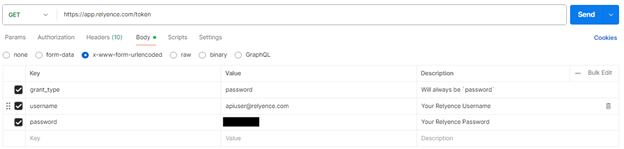
Once we have entered our information, we click “Send”. If successful, the response will look like the following:
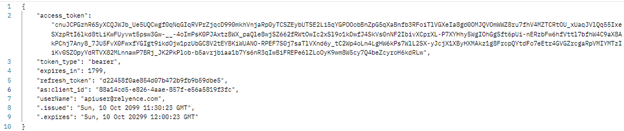
The “access_token” is our Bearer Token and is what we will use to make all your other requests through the Relyence API. Note that by default, the Bearer Token expires after 30 minutes, so you will need to request a new token periodically by calling the /token endpoint.
After generating a Bearer Token, you can begin making API requests. A common request is to get a list of all analyses in the Relyence system. We start by making a GET request to the /analyses endpoint. In this case, since we are using the Relyence cloud-based solution, the complete URL to send the request to is “https://app.relyence.com/v1/analyses”. Note that any request besides the /token request requires the /v1/ before the endpoint. In this case, the /analyses endpoint only requires the our Bearer token, so our request looks as follows:

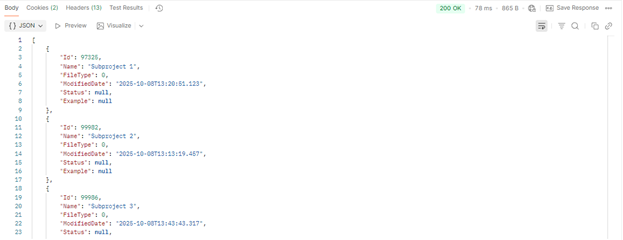
This request returns basic information about each analysis in the our Relyence system, including Analysis name, Analysis Id, last modified date, and the file status (if applicable). The Analysis ID is especially important, as many Relyence API calls require it.. A typical response looks like the following:
Example: Using Python and the Relyence API
Using Python with an API is a great way to take what you’ve tested in tools like Postman and turn it into something you can automate. Instead of sending individual requests manually, Python lets you write simple scripts that can connect to an API, get or send data, and handle responses automatically. This is especially useful if you want to pull data regularly, update information in bulk, or build a small tool to streamline your workflow. Python is beginner-friendly, and with just a few lines of code, you can start making real use of what the Relyence API offers.
In this example, we’ll use Python’s built-in http.client module to interact with the Relyence API. No extra libraries or installations are needed—everything works with the standard Python setup.
Our first step is to make a POST request to the /token endpoint, using our Relyence API key, username, and password. This call will return a JSON response containing your Bearer Token, which is required for making authenticated requests to other endpoints. You can parse this JSON using Python’s json library.
Here’s how we make that initial request:
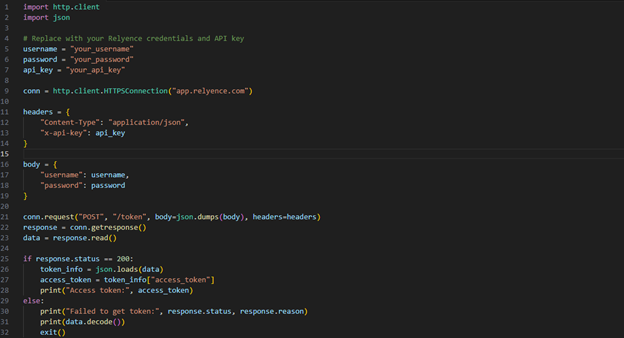
If the request is successful the response will include a Bearer token that can be used for the next 30 minutes. Note that this code can be reused whenever we need to request a new token.
Once we’ve retrieved the token, we can use it to make authenticated requests to other parts of the Relyence API. For example, the /analyses endpoint can be used to retrieve a list of all analyses in our Relyence system. The code below shows how to send that request using the Bearer token from the previous step:
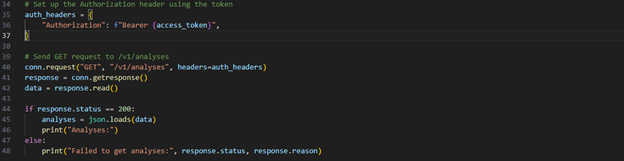
This request returns useful information about each analysis including the name, ID, last modified time, and file status (if applicable). The analysis ID, in particular, is used throughout the Relyence API and is required for many requests. This template can be modified to the other Relyence API requests, like retrieving the list of Functions in an FMEA or inserting Incidents into FRACAS.
Example: Using C# and the Relyence API
Using C# with the Relyence API is a powerful way to bring data and functionality from external systems into your own applications. If you’re already working in a .NET environment — such as building desktop, web, or backend apps — integrating the Relyence API with C# allows you to automate tasks, display live data, or perform actions like creating and updating records. It’s a great next step after testing in Postman, especially if you want to build API calls directly into your software projects.
Relyence provides a software development kit (SDK) for integration into C# environments, and also has a guide for those new to using the Relyence API. For more information, follow the Getting Started with the Relyence API page in the Relyence Help documentation center.
Resources and FAQs
What resources are available to help me get started? Where can I find all the Relyence API calls I can make?
The Relyence Help documentation is an invaluable resource for users looking to maximize their use of the Relyence API. It provides comprehensive information on the core functionalities of the API across all Relyence products, helping you understand how to leverage its full potential.
Additionally, the documentation features a Postman Collection that includes practical examples of available Relyence API functions, making it easier for developers to test and implement API calls.
For C# developers, Relyence offers a our dedicated SDK available in our documentation center. The SDK includes installation instructions and step-by-step guidance to simplify integration within .NET environments.
What support does Relyence provide with their API?
If you’re new to API tools but want to take advantage of the Relyence API in your workflow, we can help. Our support team is here to help guide you through the implementation process, whether you’re setting up your first request or working toward full integration with your systems. Feel free to contact our support team, and we’ll work with you to ensure you’re able to use the Relyence API confidently and effectively.
How do I report an issue or provide feedback about the Relyence API?
If you encounter any issues or have questions, don’t hesitate to reach out to the Relyence support team. Our dedicated team is here to assist you with any challenges you may encounter. Additionally, we value your feedback and will ensure that any suggestions are communicated to our development team, helping us better meet your needs.
Conclusion
Getting started with the Relyence API can seem intimidating at first, but with the right tools and a bit of guidance, it’s completely accessible, even for those new to APIs. Whether you’re testing individual endpoints or building automated integrations, you now have the foundation to authenticate requests, work with responses, and begin developing custom solutions tailored to your needs—opening the door to customizing and streamlining how you interact with your Relyence data.
As you continue exploring everything Relyence has to offer, don’t forget to take advantage of the resources in the Relyence Help documentation, including the Postman Collection and SDKs. If you are looking for more assistance in setting up a Relyence API integration for your workflow or have questions, don’t hesitate to contact our Relyence support team.