

Relyence is excited to introduce Relyence 2026! Our commitment to best-in-class tools shines through in this latest release which offers a wealth of new high-powered capabilities. This newest milestone supports our mission to deliver cutting-edge reliability, quality, and risk analysis tools.
From AI-assisted data generation and enhanced Worksheet capabilities in FMEA, to sparing and cost calculations in RBD, multiple Parts libraries in Reliability Prediction, robust workflow and data management controls, and more, Relyence 2026 delivers powerful new features that address key engineering challenges and incorporate valuable feedback from our customers.
Read on for a closer look at what’s new in Relyence 2026.
Relyence Introduces the Next Generation in FMEA Software!
Relyence’s flagship FMEA software continues to be the tool of choice for analysts worldwide. Our latest additions include an AI-assisted FMEA generation tool, support for Undo and Redo, and customizable cell-based formatting, and more.
AI-Assisted FMEA Creation
One of the most exciting additions in this release is the ability to leverage artificial intelligence (AI) to generate FMEA data directly within Relyence FMEA, enabling engineers to build and enhance FMEAs more efficiently than ever before. Powered by ChatGPT, this new capability helps to generate key FMEA elements including Functions, Failure Modes, Effects, Causes, and related supporting data, directly through an integrated AI engine. Rather than starting from a blank Worksheet, analysts can now jump-start their FMEAs with intelligent, context-aware suggestions tailored to their specific situation. In addition to reducing the time to create a new FMEA, these AI-generated suggestions can also be used to augment existing FMEA Worksheets, helping teams find gaps in their data and expand coverage in their FMEA Worksheets.
AI-generated FMEA data is presented through the SmartSuggest panel, where analysts can easily review, evaluate, and selectively incorporate the recommended content into their FMEA Worksheets. This ensures that AI acts as a productivity accelerator, not a replacement for engineering judgment, allowing teams to maintain control over the final content while significantly reducing manual effort during data entry.
Additional benefits of AI-generated suggestions in Relyence include:
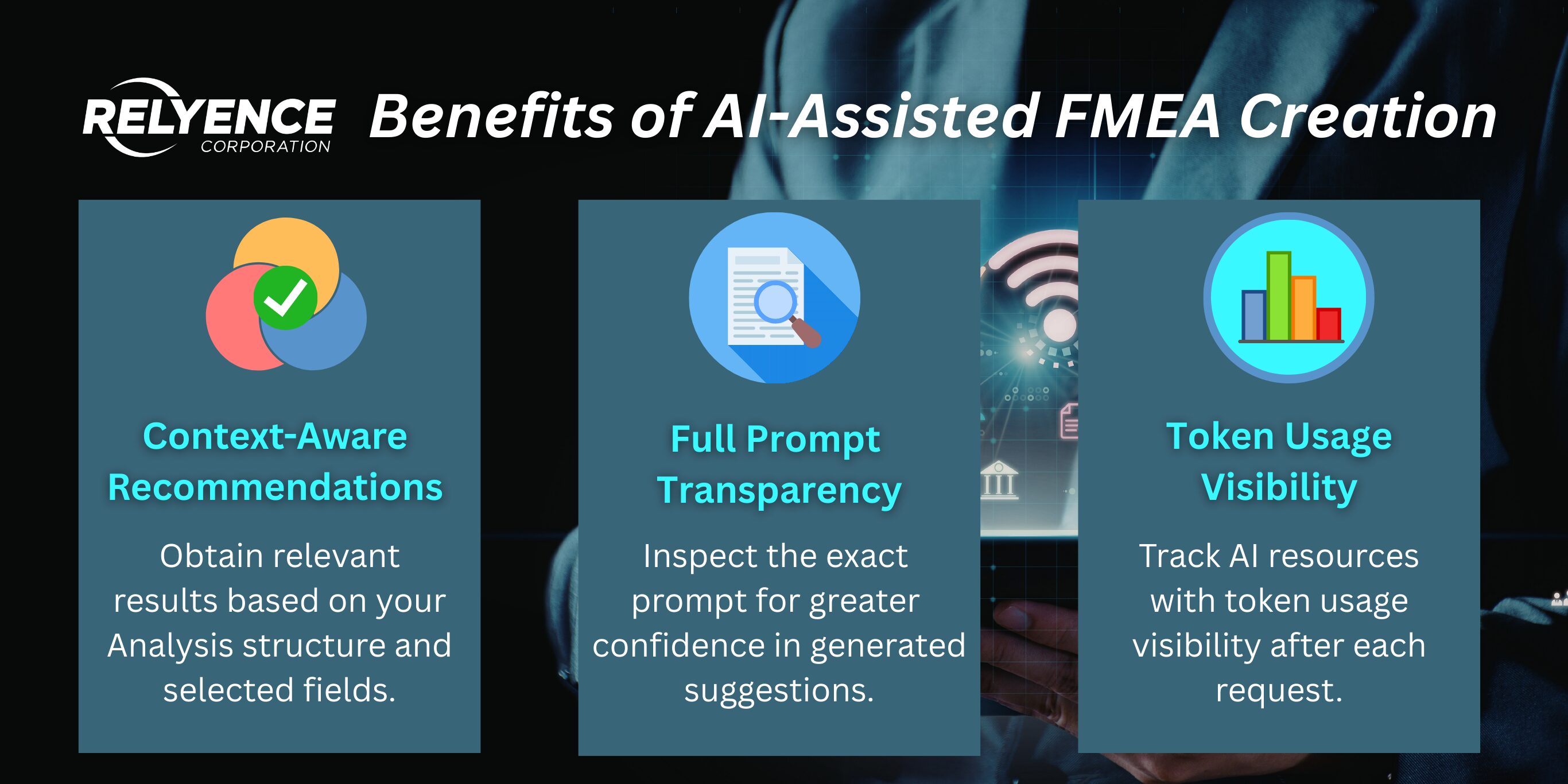
- Context-aware recommendations driven by the combination of your existing Analysis Tree structure, selected Worksheet fields, and FMEA type, help to ensure relevant and meaningful results.
- Full prompt transparency, including the ability to inspect the AI prompt sent from Relyence to ChatGPT, giving you confidence and clarity in how suggestions are generated.
- Token usage visibility enables you to keep track of your overall AI resource usage.
Together, these capabilities accelerate FMEA generation by providing intelligent guidance where it’s needed most, supporting both experienced engineers as well as newer analysts. Importantly, you retain full control over which suggestions are accepted, edited, or discarded, keeping data quality, traceability, and engineering intent front and center.
Data Security
Behind the scenes, Relyence intelligently constructs AI prompts that are tailored to your specific FMEA context. This includes defining the FMEA type being used, numerical risk criteria scales, and structured formatting rules to ensure that returned suggestions can be easily reviewed and added to your Worksheet. These built-in rules help ensure responses are relevant, usable, and aligned with your analysis methodology.
By default, Relyence includes your Analysis Tree item name in the AI prompt to improve the relevance of generated results. However, you have full control over what information is shared. You may choose to override the default behavior by providing a custom subsystem description. In addition, Relyence allows you to define optional, user-specified search criteria to further guide the AI output.
This flexible approach strikes a careful balance between providing enough context for meaningful results and maintaining strict control over what data is shared externally. Relyence also allows you to view the complete prompt and detailed usage statistics associated with each AI request, ensuring transparency, traceability, and confidence in how your data is handled.
AI-Assisted FMEA Example
For an example scenario, consider the case of an engineer who is creating a new Design FMEA for a Quadcopter Drone Propulsion System. The selected Analysis Tree item is Motor Assembly. The engineer uses the AI-powered Generate Suggestions function to generate FMEA data for inclusion in the Worksheet. AI-generated suggestions are accessed through the SmartSuggest panel, available from the top toolbar in Relyence FMEA by clicking SmartSuggest > Generate Suggestions in Relyence FMEA. From there, our engineer can request AI-generated content for specified FMEA fields and review each suggestion before choosing whether to add it to the Worksheet. Example results are shown below:
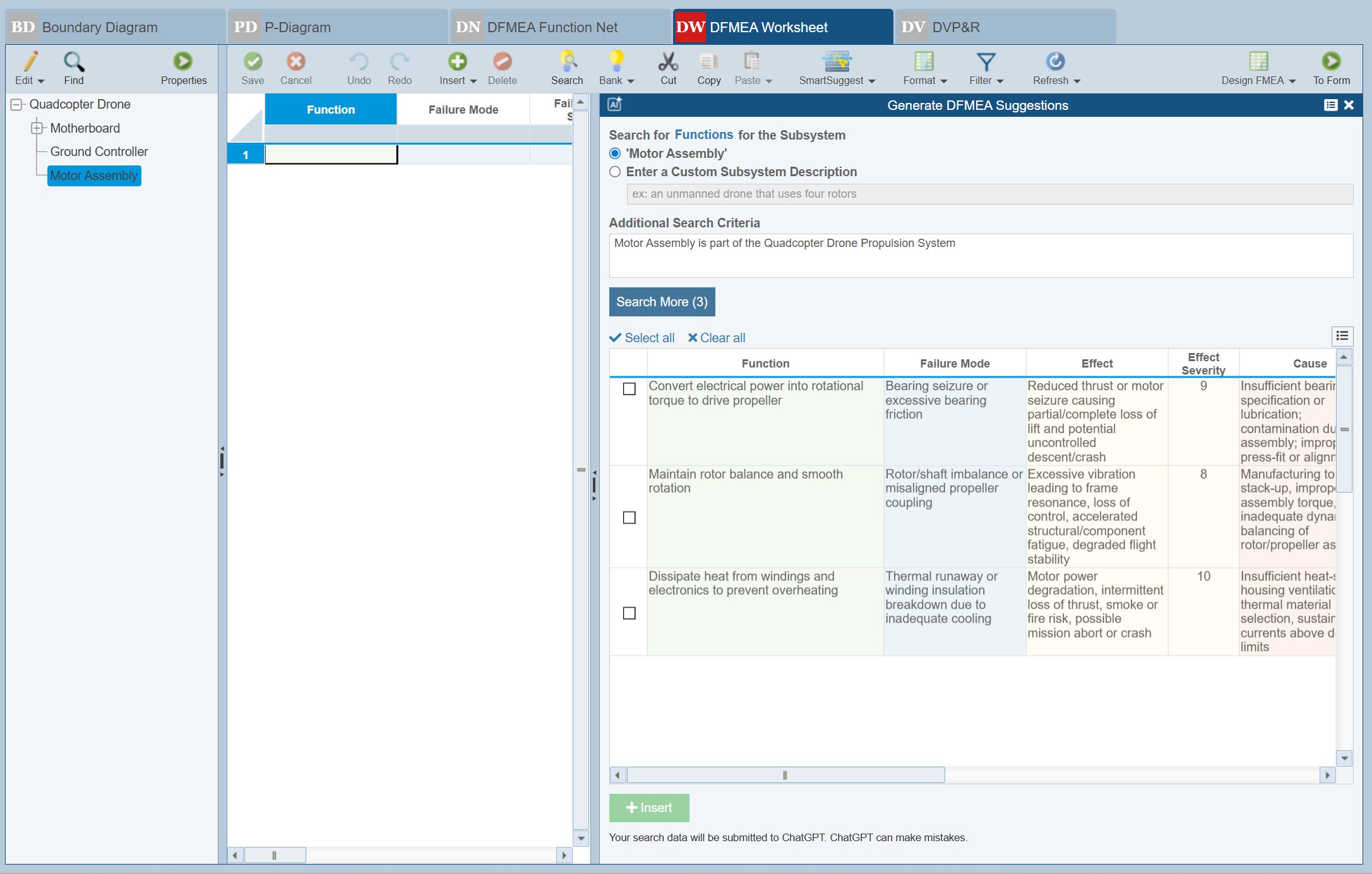
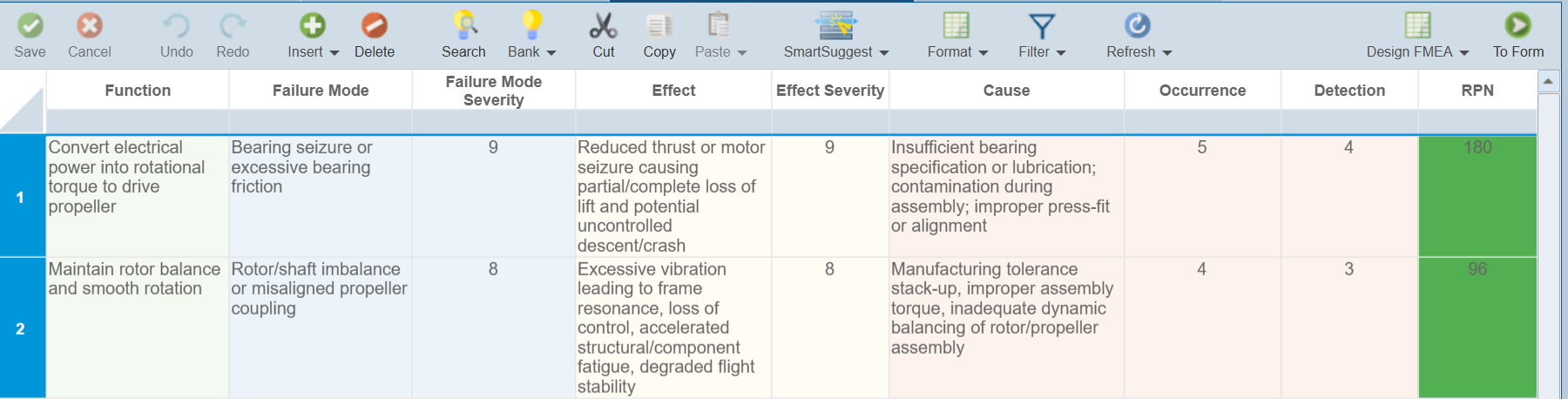
The engineer reviews each item in the SmartSuggest panel and decides to add the first two suggestions to the FMEA Worksheet. Selecting the checkboxes next to the first two items and then clicking the Insert button adds the information to the Worksheet. In this case, we used the SmartSuggest AI engine to populate Function, Failure Mode, Effect, and Cause text data as well as numerical values for Severity, Occurrence, and Detection.
Continuing on, the engineer can continue to use the AI-assisted SmartSuggest to build out the FMEA Worksheet and can then go back and complete or update any information needed to complete the analysis.
Try it today!
If you are an existing customer, AI-assisted FMEA capabilities can be added to your Relyence FMEA license by contacting us for pricing information. You can also register for a free trial of Relyence FMEA to explore a limited trial of these new AI-powered features.
Whether you are starting a new analysis or enhancing an existing FMEA, the new AI Generate Suggestions feature helps improve completeness and efficiency, allowing your team to focus more time on engineering insight and decision-making, and less time on manual data entry.
Undo & Redo on FMEA Worksheets
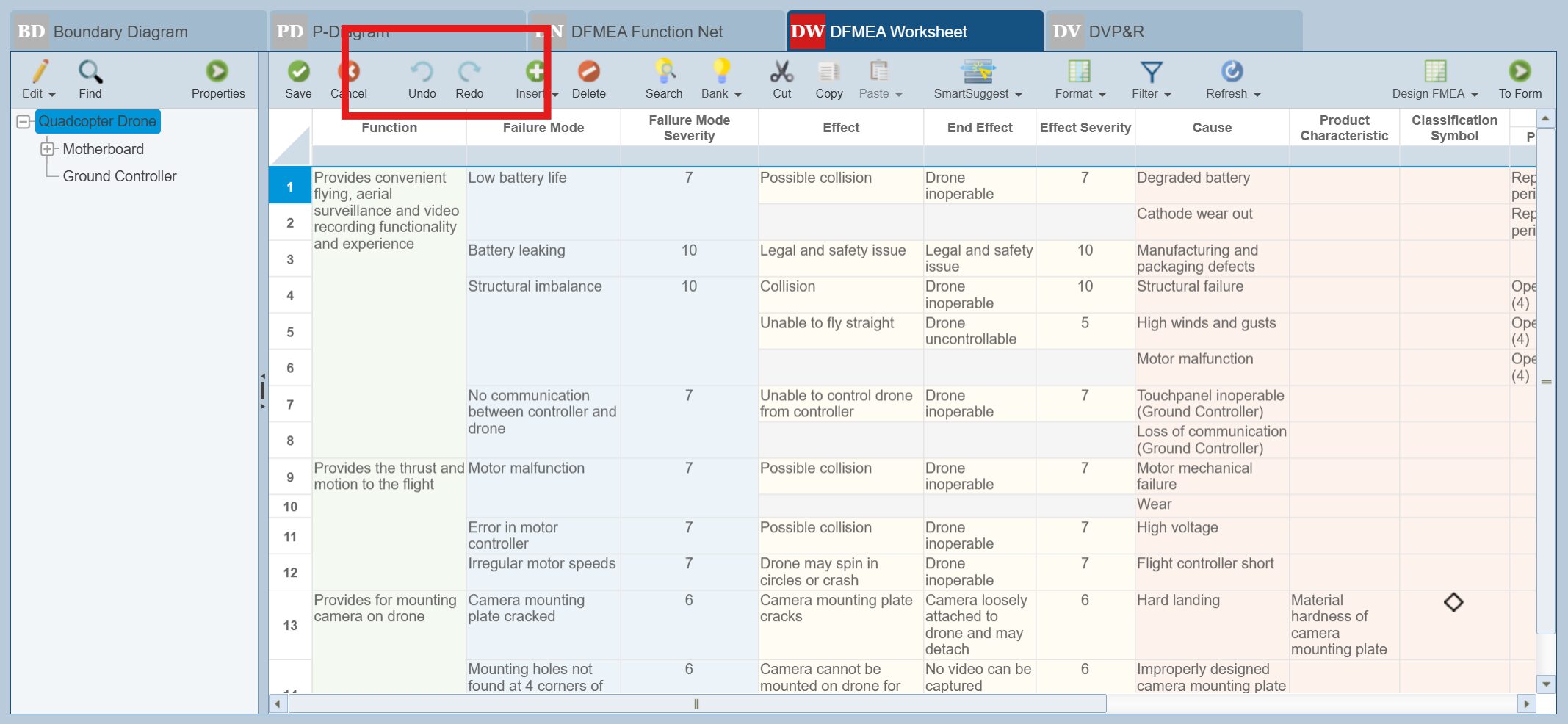
Version control and flexibility are essential when refining complex FMEA Worksheets, where changes are often frequent and iterative. With Relyence 2026, Relyence FMEA Worksheets now support Undo and Redo across unsaved Worksheet actions, including adding, deleting, or editing records, formatting changes, and more, giving users greater confidence and control as they work.
Undo and Redo allow you to sequentially step backward or forward through all unsaved Worksheet actions that exist in the queue. This makes it easy to quickly revert unintended changes or retrace your steps one action at a time without disrupting your broader analysis. Regardless of what changes you’re making, you can work more freely knowing that unsaved changes are easily reversible.
This new enhancement delivers a meaningful improvement in day-to-day usability, especially during collaborative analysis and review cycles where FMEAs evolve rapidly. By extending Undo and Redo support across a wide range of FMEA elements and interactions, Relyence ensures the experience is both thorough and practical, helping teams work more efficiently while maintaining accuracy and confidence in their analyses.
Customizable Cell Formatting on FMEA Worksheets
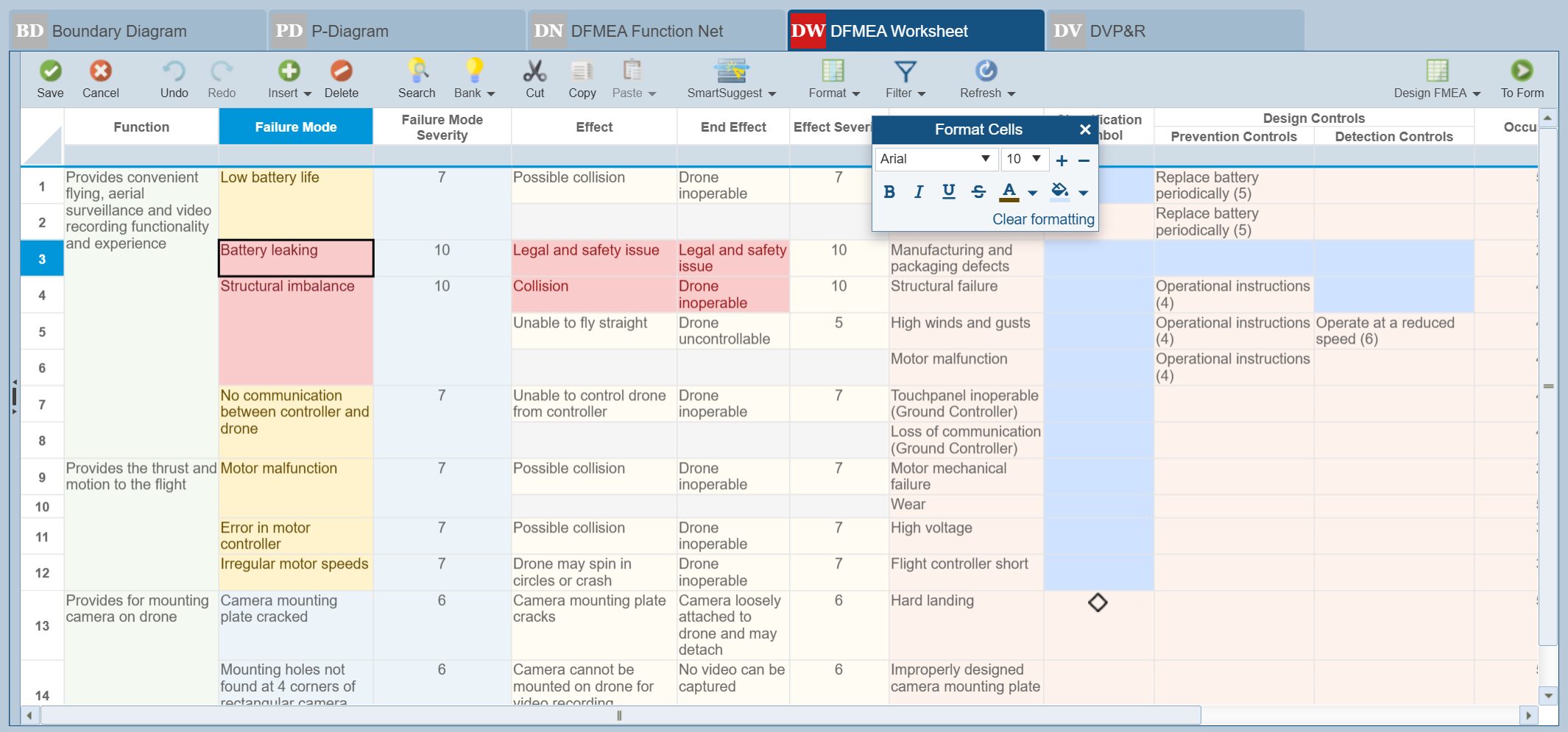
Visual clarity and focus can dramatically improve the effectiveness of the FMEA review process, especially as analyses grow in size and complexity. With Relyence 2026, customizable cell formatting gives teams greater control over how critical information is presented within FMEA Worksheets and reports.
Users can apply text formatting, colors, and cell highlighting to draw attention to what matters most, whether that’s high-risk failure modes, elevated RPNs, unusual operating conditions, items requiring immediate action, or a clear visual indication of where they left off. This visual differentiation helps reviewers quickly identify priorities during design reviews, cross-functional meetings, and audits, reducing the time spent searching through dense tables of data.
Importantly, these visual enhancements are purely cosmetic and do not alter the underlying analysis or calculations. Formatting styles can be included on Reports as well, ensuring that shared deliverables maintain the custom formatting styles that are set. The result is clearer communication without compromising data integrity or traceability. By making FMEAs easier to read and interpret, customizable cell formatting helps teams communicate risk more effectively and drive faster, more confident decision-making across the organization.
Function/Process Step Detail Column
New in Relyence 2026, Relyence FMEA introduces an optional Function/Process Step Details column that can be added alongside Functions or Process Steps, giving teams even greater flexibility in structuring their analyses. This new level allows organizations to further tailor their FMEA hierarchy to match internal workflows or program-specific needs.
Users can define custom fields at this level using a wide range of data types, including text, numeric values, team member assignments, checkboxes, images, and more. All existing Relyence functionality is fully supported, including Knowledge Banks, Reporting, Audit Trails, Template Transfer, and custom Formulas, ensuring the new level integrates seamlessly into established processes. This capability is available across all FMEA Worksheets, including PFMEA Worksheets, Control Plans, DVP&R, FMECA and more, enabling consistent customization throughout the entire analysis lifecycle.

Knowledge Bank Enhancements: Smarter Search & Pre-Release Control
Relyence Knowledge Banks are a flagship capability of Relyence FMEA, providing one of the most powerful ways to capture, standardize, and reuse FMEA data across your organization. Now, Relyence 2026 includes new features that offer greater configurability to tailor your data search experience.
Pre-Release Setting
Administrators can now mark Knowledge Banks as Pre-Release, preventing data pushes and pulls, and keeping them hidden from Analysis search results until they are approved and ready for use. The new Pre-Release setting makes it easier to prepare, review, and refine corporate knowledge before it’s available for use by your teams.
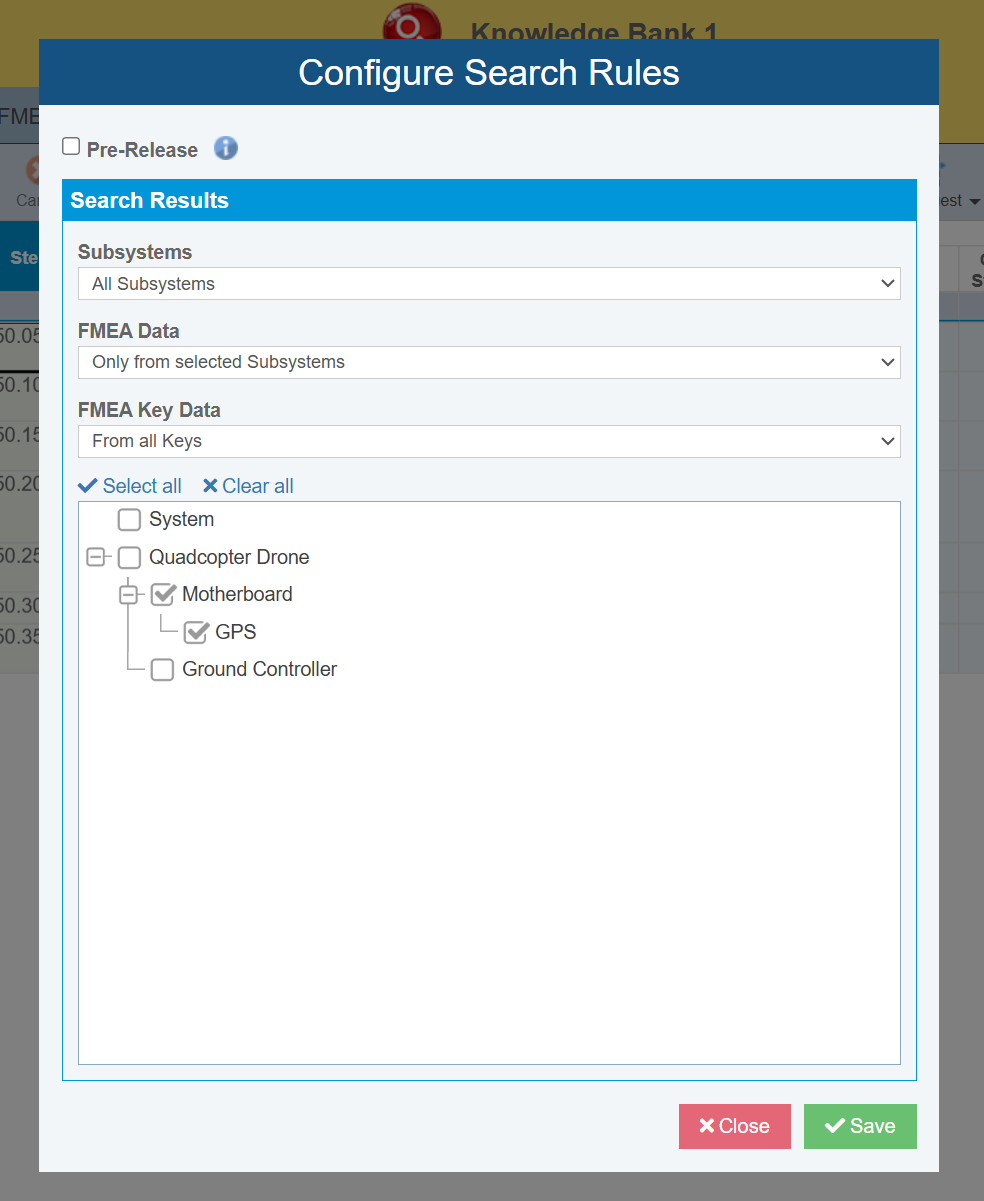
These enhancements give you better governance of shared content and improve the overall quality and reusability across analyses. You can find the new Pre-Release setting by selecting Configure > Search Rules from the sidebar when editing a Relyence Knowledge Bank.
Configurable Search Rules
Configurable Search Rules allow you to control which Knowledge Bank data appears in Analysis and Knowledge Bank searches. You can restrict search results based on selected Subsystems and FMEA data type. Some example use cases are:
- Restrict search results to include only data from selected subsystems in the Knowledge Bank.
- Restrict access to hide all FMEA Key data, such as individual Failure Modes, so that search results include only data that is tied to a Subsystem.
- Restrict access so that lower-level FMEA Key data is excluded from your search results. For example, this would mean a Knowledge Bank search for Failure Modes would return only Failure Modes and not Causes or Effects associated with that Failure Mode.
This targeted search capability ensures your team focuses only on the most relevant information, enhancing consistency while minimizing unnecessary clutter. Set your Search Rules by selecting Configure > Search Rules from the sidebar when editing a Relyence Knowledge Bank.
Spares and Cost Calculations Take Relyence RBD to a New Level
Relyence RBD provides a powerful and intuitive environment for calculating reliability metrics on complex systems through reliability block diagrams. Engineers can represent real-world architectures, evaluate redundancy strategies, and quantify performance metrics such as reliability, availability, and downtime. With advanced simulation and modeling capabilities, Relyence RBD helps teams understand how failures, repairs, and operational constraints impact overall system behavior. These insights support better design decisions and maintenance plans across a wide range of industries. New in Relyence 2026 are two exciting capabilities in Relyence RBD: cost calculations and support for spare pools.
RBD Cost Calculations
Reliability modeling is often driven by metrics such as availability and downtime. But in real-world operations, downtime is not just a performance indictor— it carries a direct financial consequence. Whether supporting industrial production lines, fleet operations, infrastructure networks, or mission-critical systems, organizations must understand not only how often failures occur, but also what they cost when they do.
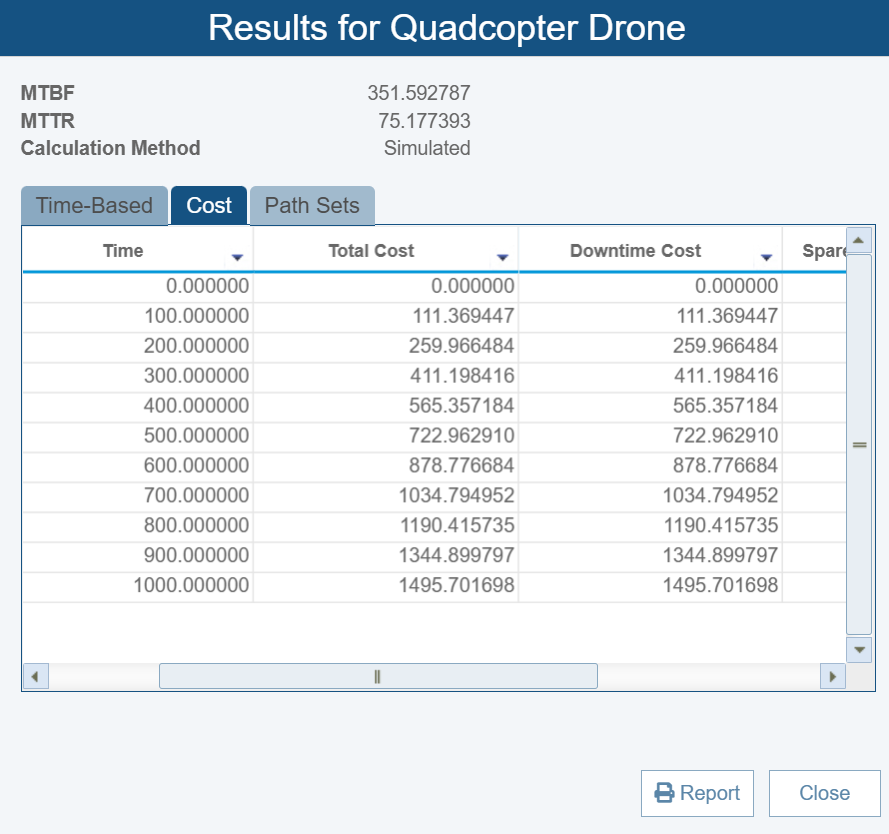
Relyence 2026 introduces cost calculations in Relyence RBD, enabling analysts to translate reliability results into meaningful financial insight. By incorporating downtime cost modeling directly into reliability block diagrams, teams can evaluate the true economic impact of failures, repair delays, and shortages.
Quantifying the Financial Impact of Downtime
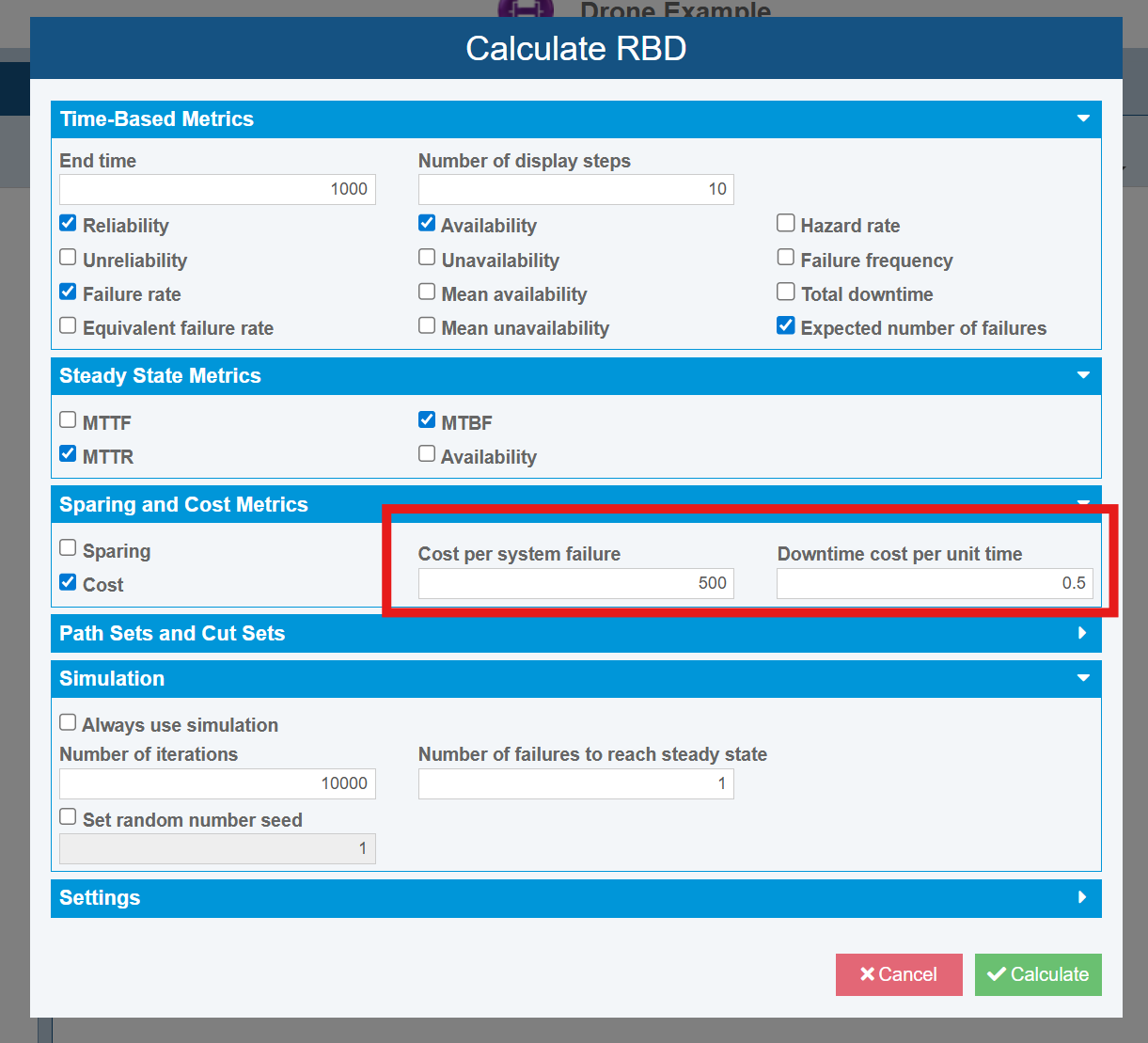
With Relyence RBD cost calculations, analysts can now define a fixed Cost per system failure, allowing each outage to accumulate a financial penalty whenever the system transitions into a down state. This fixed cost is dependent on your specific situation. It may include costs incurred due to contractual penalties, restart procedure time, reinspection fees, etc.
Additionally, in many environments, downtime costs scale with duration. Manufacturing systems lose revenue per hour, fleets lose capability per day, and service platforms incur escalating penalties the longer outages persist. Relyence RBD now also supports Downtime cost per unit time, enabling cost accumulation based on the length of system unavailability.
These new calculation inputs make it possible to answer questions such as:
- What is the financial value of improved redundancy or repair strategies?
- How much additional cost is required to achieve higher system availability?
- What is the cost impact of frequent short outages versus fewer major failures?
By combining availability modeling with incurred costs, Relyence RBD now offers a powerful way to understand how engineering improvements directly affect business success. This provides a solid framework for making critical business decisions. Analysts can compare design alternatives, evaluate redundancy investments, and optimize maintenance for performance and lifecycle cost.
With cost calculations integrated into Relyence RBD, organizations can move beyond reliability and availability metrics alone and make informed, financially grounded decisions about system uptime, sustainment planning, and resource investment. To perform cost calculations in Relyence RBD, simply set a Cost per system failure and Downtime cost per unit time in the Calculate RBD dialog.
RBD Spare Pools and Sparing Calculations
When performing RBD analysis, the impact of spare components is key to providing a real-world assessment of system availability. Often, spare components for large systems are pooled and deployed as needed among multiple assets. If the spares allocations are not accounted for, RBD results can lead to optimistic assumptions about availability, maintenance effectiveness, or downtime. Instead, modeling RBDs based on shared spare pools enables reliability and maintainability analyses that reflect real-world scenarios.
Relyence 2026 adds support for spare pools to Relyence RBD, allowing for more accurate modeling of systems which need to account for spares allocations. Relyence RBD spare pools allows analysts to define and manage shared spare resources that can be allocated across multiple assets in an Analysis.
Model Shared Spares with Real-World Accuracy
With spare pools, users can define a centralized pool of spare parts or assemblies and associate those spares with multiple blocks. When a failure occurs, Relyence RBD then draws from the available spare pool to maintain system uptime if needed. If spares are exhausted and repairs are delayed, system availability and downtime are impacted.
This approach allows engineers and analysts to answer critical questions such as:
- Are we carrying enough spares to meet availability targets?
- Which components benefit most from spare pooling?
- How does pooling spares across multiple assets compare to dedicating spares per component?
- Are there diminishing returns to adding more spares?
Spare pools help organizations avoid overly optimistic reliability assumptions and better understand operational risk under real-world constraints.
Analyze Tradeoffs Between Cost, Availability, and Risk
Spare pools provide new insight into the tradeoffs between inventory cost and system performance. For example, carrying more spares can reduce downtime but results in a higher financial cost. Conversely, carrying fewer spares may save money but increases the risk of extended outages when failures cluster or repair cycles prolong unexpectedly.
By adjusting pool size, lead times, or replenishment policies, teams can explore different scenarios and determine where additional investment in spares delivers meaningful improvements and where it does not. This makes spare pools especially valuable for improving design decisions.
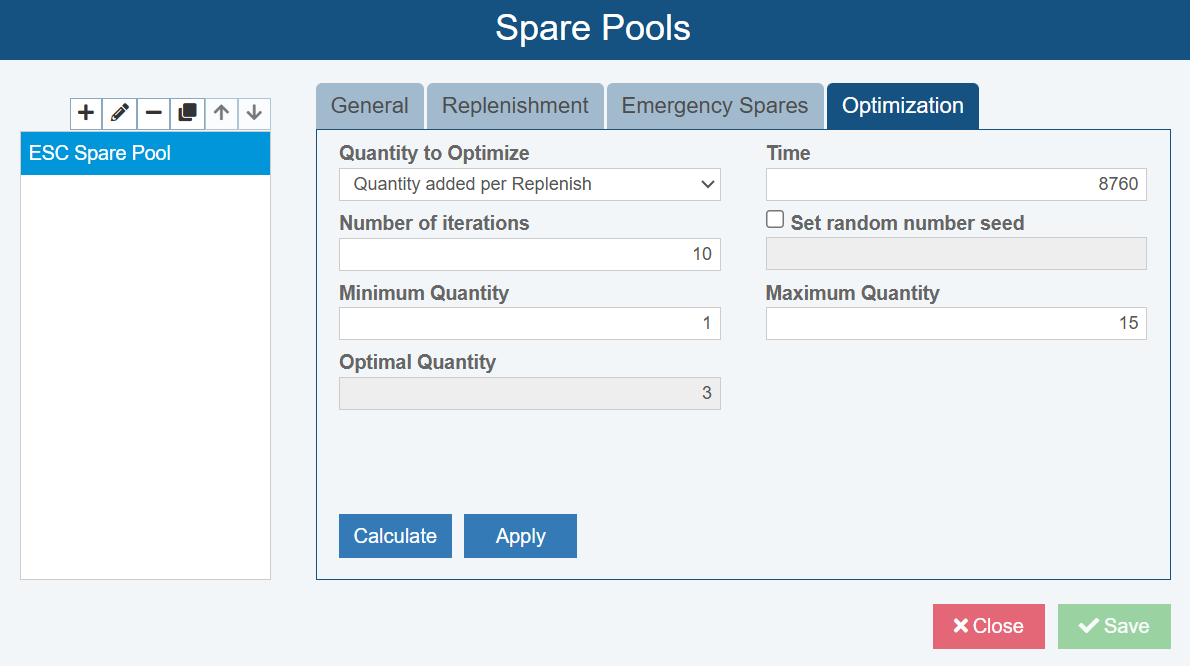
Additionally, spare pools in Relyence RBD include a useful Optimization feature that allows analysts to engage the Relyence RBD simulation engine to compute an optimal sparing strategy including starting in-stock quantity, Replenishment quantity, Emergency quantity, and Offsite quantity based on the RBD Block and sparing parameters that were set.
Example: Cost-Driven Analysis in Relyence RBD
Let’s look at a simple example to evaluate a quadcopter drone used for inspection missions. Each drone contains an Electronic Speed Controller (ESC), which is critical to flight operation. In this case, the drone relies on a single ESC that is a true “mission stopper”—if it fails, the drone is immediately grounded. The drone operates approximately 1,000 flight hours per year.
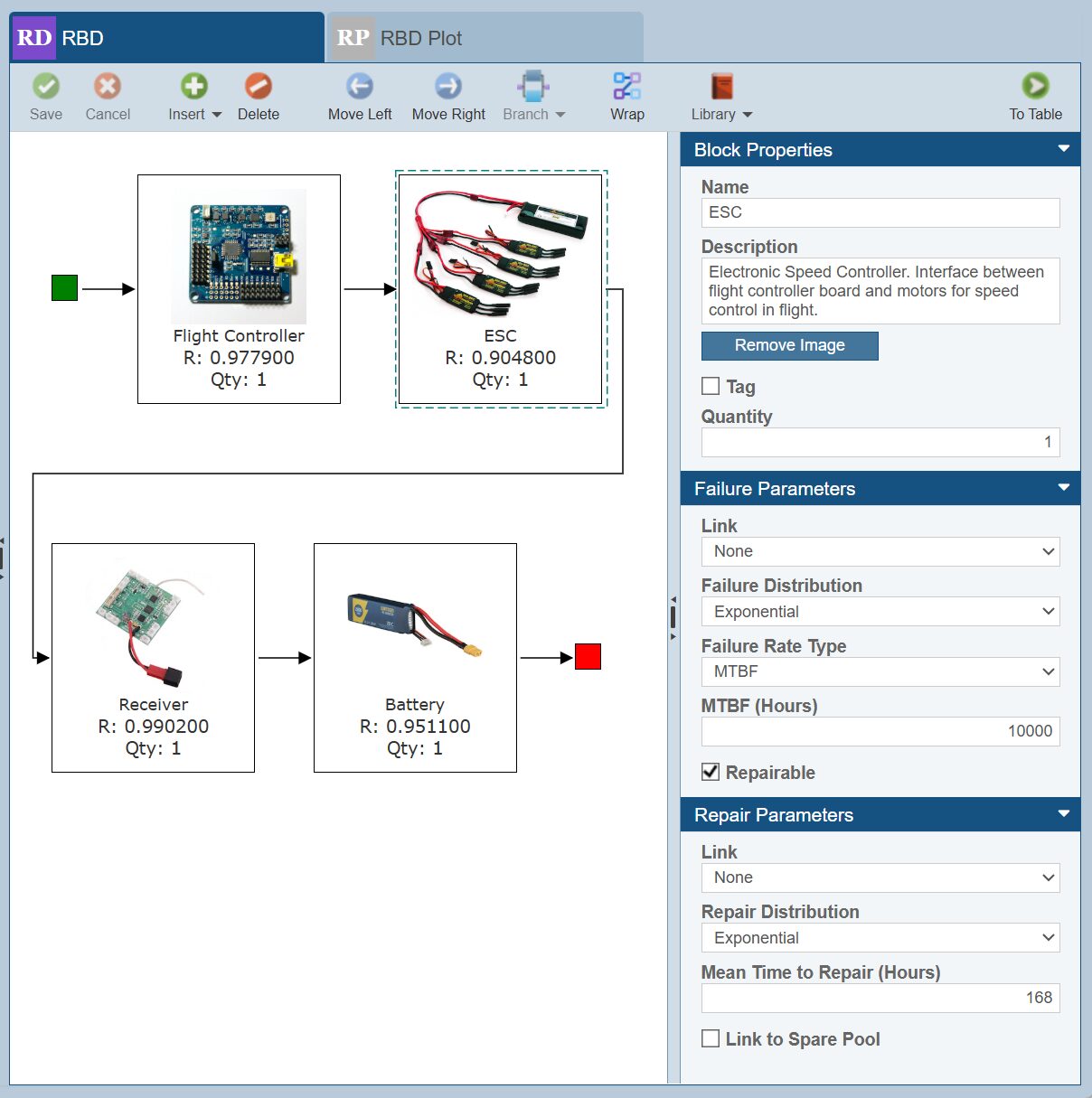
We want to quantify the cost of the current maintenance approach and evaluate whether implementing a sparing strategy could improve performance while reducing overall operational cost. At present, ESCs are replaced only on an as-needed basis, with no spares kept in stock.
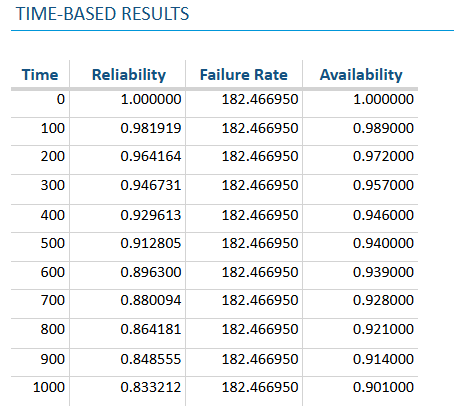
For our analysis, the ESC has an MTBF of 10,000 hours, and its effective MTTR is 1 week, including supplier lead time. The ESC is part of a larger RBD model, and up to this point, the system has met the organization’s availability requirement of 0.90 at 1,000 hours.
Baseline Cost Evaluation
First, we evaluate the cost impact of the existing situation by defining the following cost parameters in Relyence RBD:
- Cost per system failure: $500 USD
- Downtime cost per unit time: $100 USD
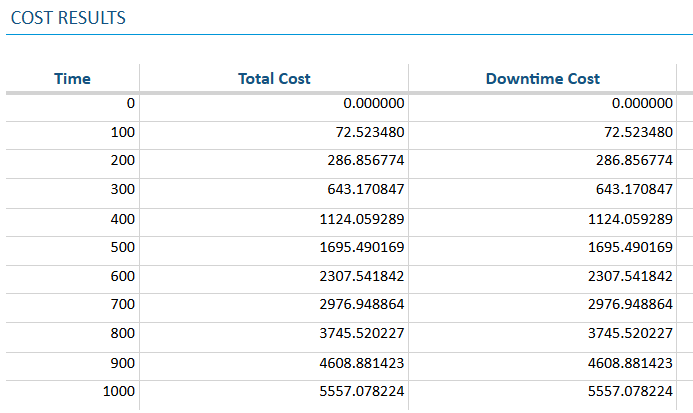
This leads to a Total Cost of over $5557 at 1000 hours.
Introducing a Sparing Strategy
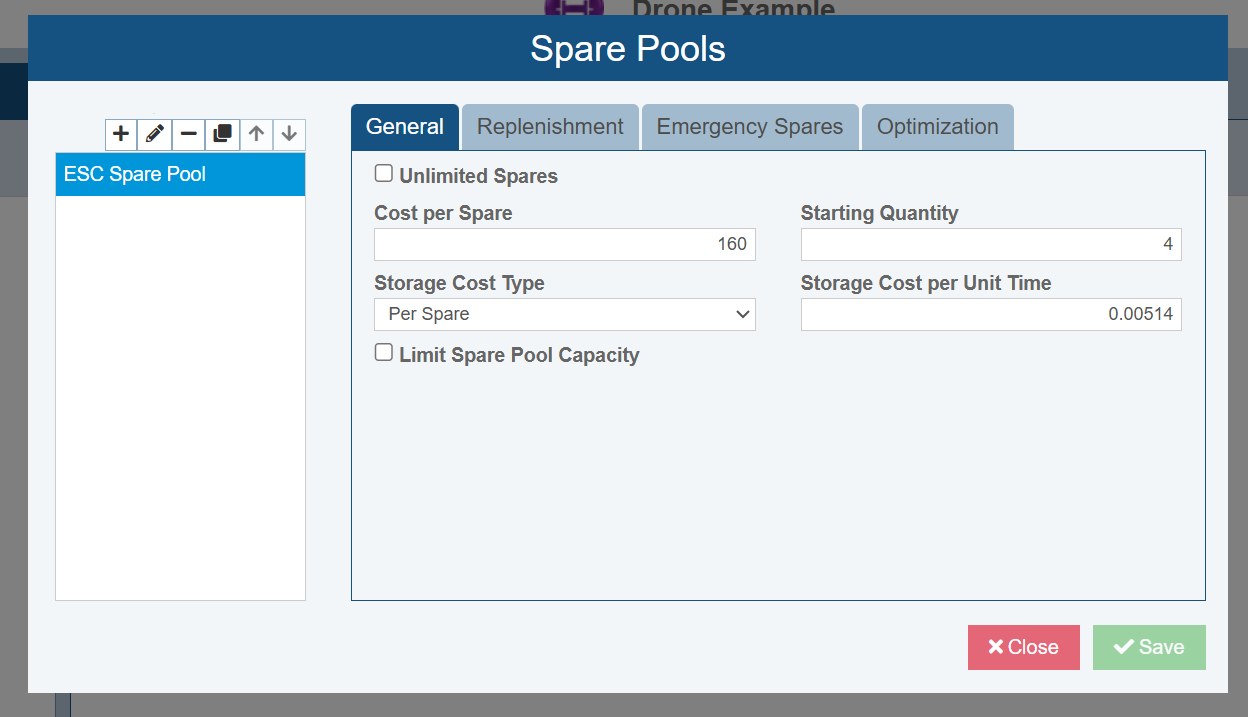
We believe that the availability could be improved and downtime cost reduced by introducing a sparing program for the ESC. An initial Spare Pool is configured with the following parameters:
- General Information
- Initial Quantity: 10 ESCs
- Cost per Spare: $160 USD
- Annual Storage Cost per Spare: $0.00514 per Unit Time (approximately $45 USD per year)
- Replenishment Strategy
- Replenish when Quantity drops to 3
- Quantity added per Replenish: 10
- Replenishment Lead Time: 1 week
- Replenishment Transport Cost: $40
- Replacement Delay
- Replacement delay per operation: 6 hours
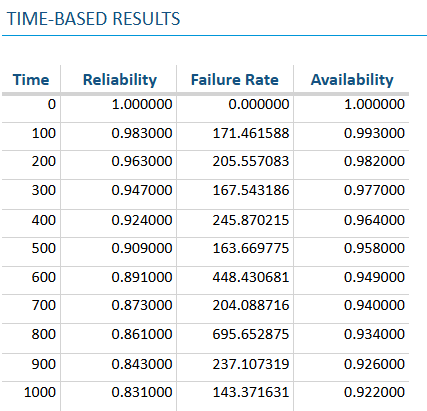
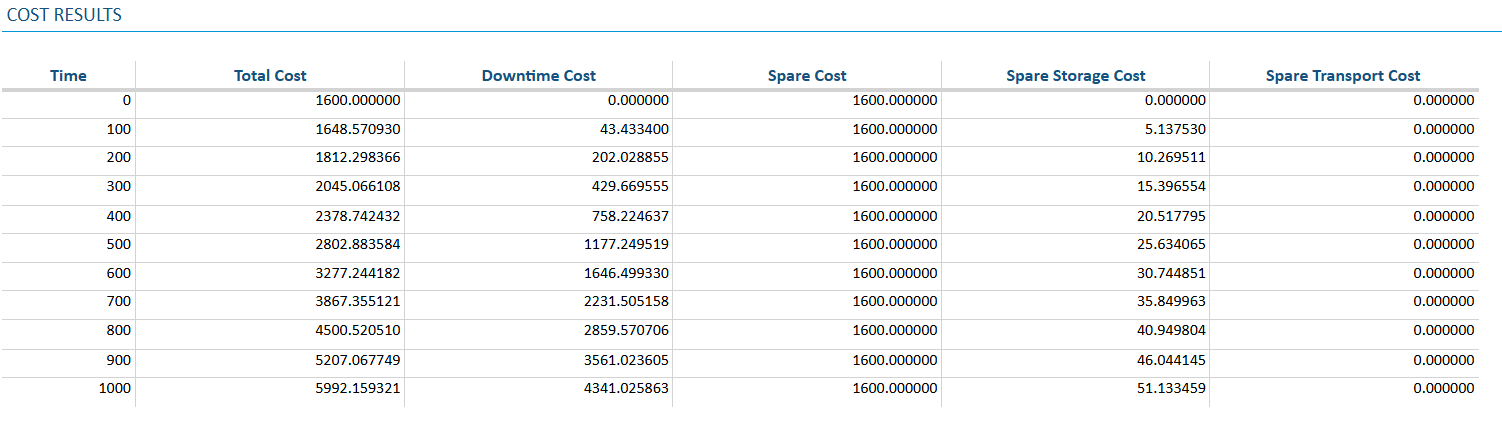
With this sparing strategy in place, we are able to increase system availability to 0.92. However, the added inventory and replenishment costs increase the Total Cost to $6,000.
Optimizing the Sparing Program
To further improve the balance between availability and cost, we can engage the Optimization calculator in Relyence RBD to determine a cost-effective sparing policy.
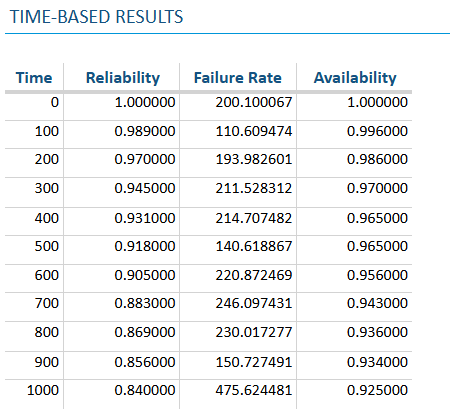
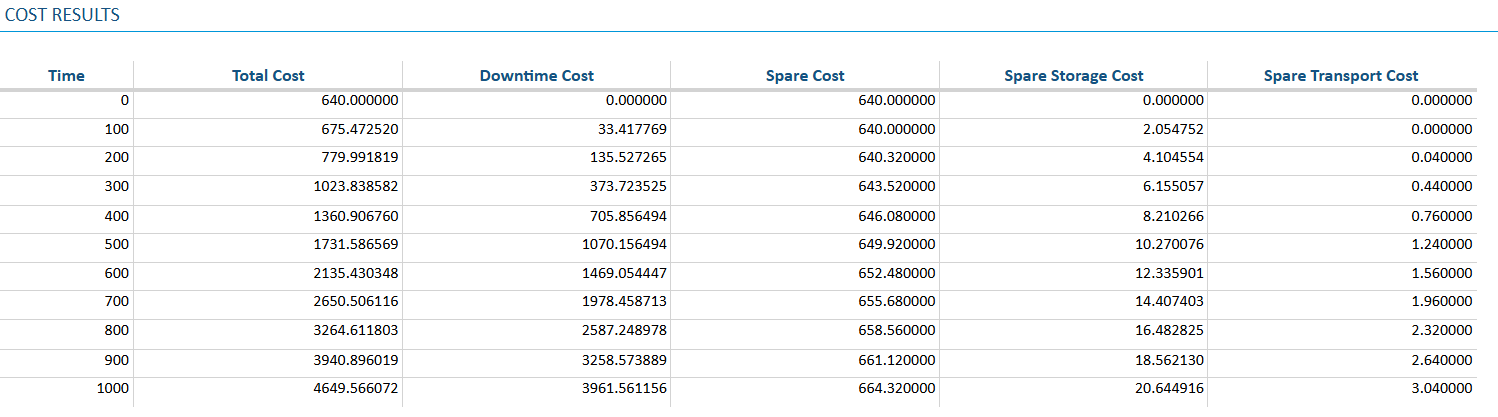
The recommended updates are:
- Update Starting Quantity to 4
- Update Replenishment Quantity to 2
With this optimized sparing strategy, availability above at 0.92, while Total Cost decreases to $4,650.
Results
By implementing and optimizing the ESC sparing program, the analyst achieves:
- Improved availability from 0.90 to above 0.92
- Reduced total cost by approximately 22%
This example demonstrates how Spare Pools and cost-based modeling in Relyence RBD allow teams to evaluate real-world sparing tradeoffs and optimize availability improvements without unnecessary expense.
New AI-Powered Capabilities Advance Productivity
Microsoft Copilot Integration Brings Microsoft 365 Intelligence into Relyence
Engineering teams rely on a wide range of tools to manage documents, collaborate across teams, and track critical project data. To help streamline these workflows, Relyence 2026 introduces integration with Microsoft Copilot, bringing a conversational AI assistant into the Relyence environment.
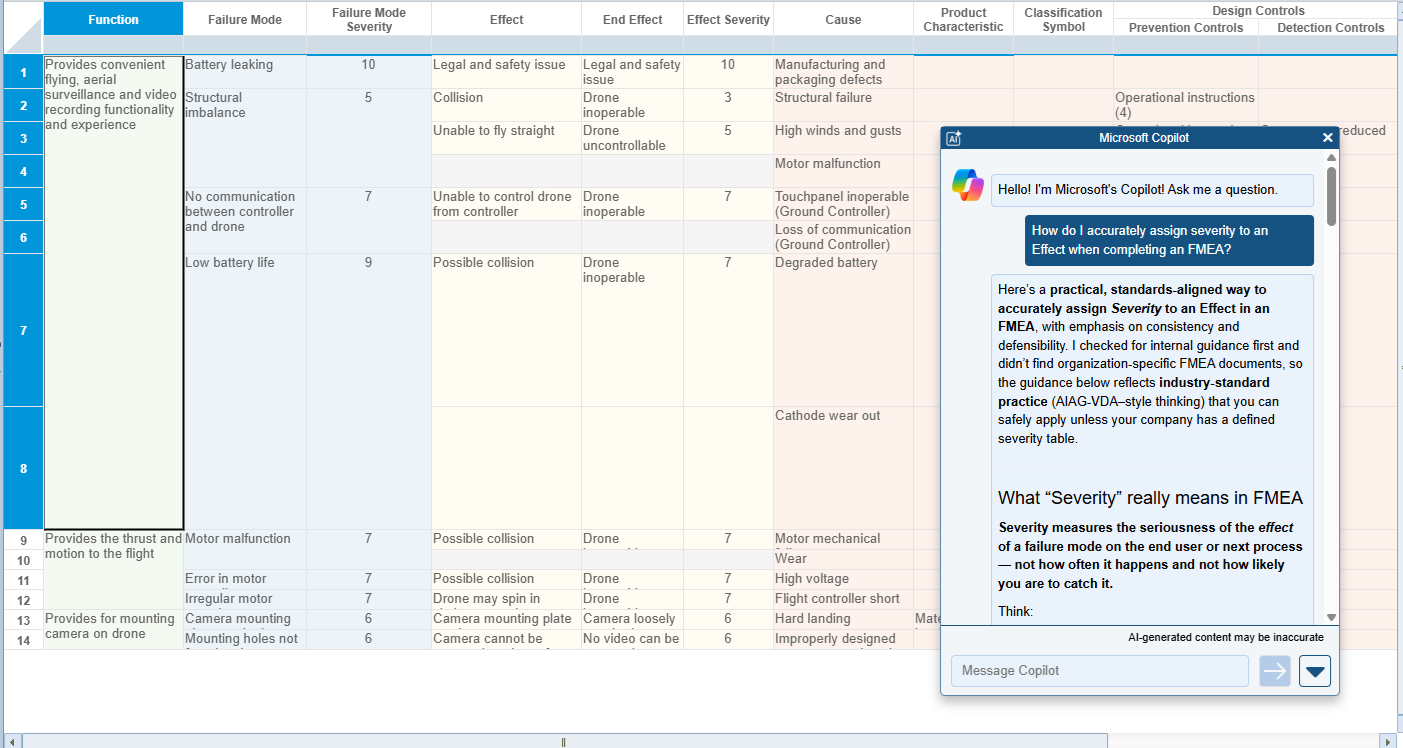
The Microsoft Copilot panel appears as a convenient in-application chat window, allowing users to ask questions and retrieve information from their Microsoft 365 environment without leaving Relyence. Whether you need to locate a SharePoint document, summarize a report, review an Excel spreadsheet, or reference recent Teams discussions, Copilot helps you find the information you need quickly and efficiently.
Access Microsoft 365 Data from Within Relyence
With Microsoft Copilot integrated into Relyence, you can interact with your Microsoft 365 data using natural language. Instead of manually navigating multiple tools, simply ask Copilot questions such as:
- “What updates were made to the inspection checklist in SharePoint last week?”
- “Show me the most recent Teams discussion about the propulsion subsystem.”
- “Summarize the data in this Excel spreadsheet.”
Copilot interprets your request and retrieves relevant information from across your Microsoft environment, helping teams stay focused on engineering analysis rather than searching for data.
AI Assistance During Engineering Analysis
In addition to accessing Microsoft 365 content, Copilot can also provide helpful guidance while working in Relyence analyses. Engineers can ask questions about reliability and risk analysis concepts directly within their workflow.
For example, while completing an FMEA, you might ask:
- “How do I determine the severity of an effect in an FMEA?”
- “What is the difference between a failure mode and a failure cause?”
- “What are best practices for defining detection controls?”
This on-demand assistance helps reinforce consistent analysis practices without interrupting your work.
Seamless Integration
The Copilot panel is accessible directly within Relyence, allowing users to continue their work while interacting with the assistant. By reducing the need to switch between applications, teams can quickly access the information and guidance they need.
By combining the analytical capabilities of Relyence with the intelligence of Microsoft Copilot, Relyence 2026 helps teams connect engineering analysis with enterprise knowledge, bringing the right information directly into the engineering workflow.
AI-Powered Relyence Help Provides Quick Answers to Your Questions
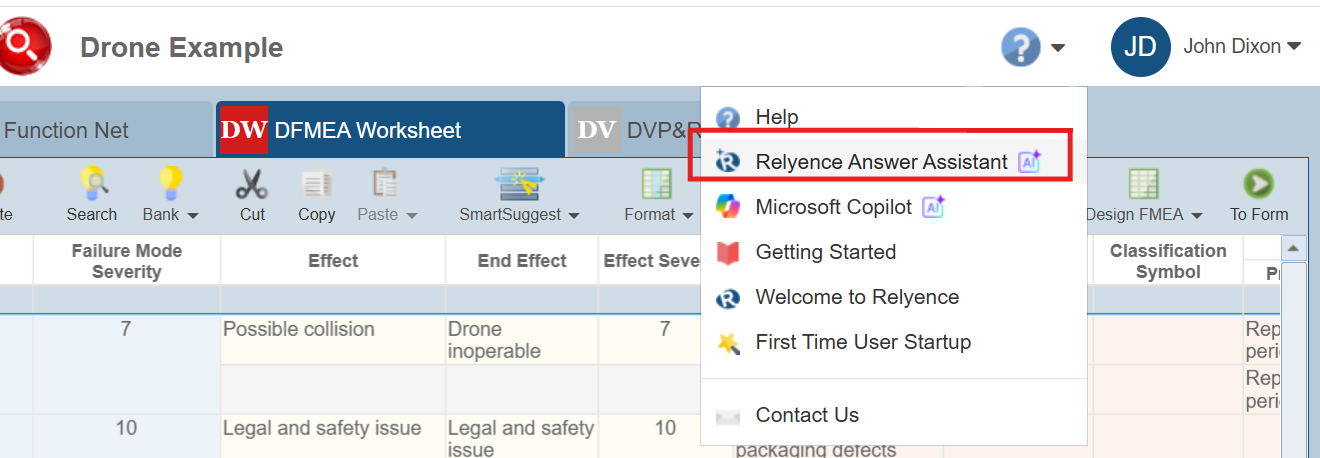
Getting the right answers quickly is critical when working through complex reliability, quality, and risk analyses. Relyence 2026 introduces the new AI-powered Relyence Answer Assistant, designed to provide fast, intelligent guidance directly within Relyence.
The Relyence Answer Assistant provides an AI-powered, conversational support line that allows users to ask questions in natural language and receive context-aware responses about the Relyence platform. If you are learning a new product, troubleshooting a feature, or looking for guidance on how to perform a specific task, the Relyence Answer Assistant can help you find the information you need as efficiently as possible. Accessible through the Help menu just to the left of the account management dropdown, the Relyence Answer Assistant provides an intuitive support line that helps both new and experienced users work more confidently.
Key benefits of the Relyence Answer Assistant include:
- Instant in-app guidance, reducing the need to search through documentation or external support resources.
- Quick answers to questions available at your fingertips rather than requiring an email or phone call to technical support.
- Natural language question support, making it easy to ask questions the same way you would ask a teammate.
- Faster onboarding for new users, helping teams adopt Relyence capabilities more efficiently.
- Improved productivity for experienced engineers, providing guidance and clarification during analysis creation and review.
By integrating AI-driven support directly into the Relyence interface, the Relyence Answer Assistant makes it easier than ever for users to stay focused, solve problems quickly, and get more value from every Relyence product.
Reliability Prediction: Support for Multiple Parts Libraries
Relyence Reliability Prediction has expanded its support for organizing and managing parts data with support for multiple Parts Libraries. This can provide multiple benefits for your analysis, including:
- Engineers can maintain distinct parts databanks for different product lines, business units, or reliability standards.
- Collaboration across teams becomes easier when parts data can be shared based on the appropriate project context.
- Users gain more granular control over parts data, reducing the risk of clutter and errors that come from a single Parts Library.
Additional notable capabilities with this new feature include:
- You can import/export Parts Libraries independently.
- Access Control features can be set to restrict Analyses to only use the appropriate Parts Library or Libraries.
- A Library Search order can be set to define the order that each Library should be searched for a given part during parts searching and import.
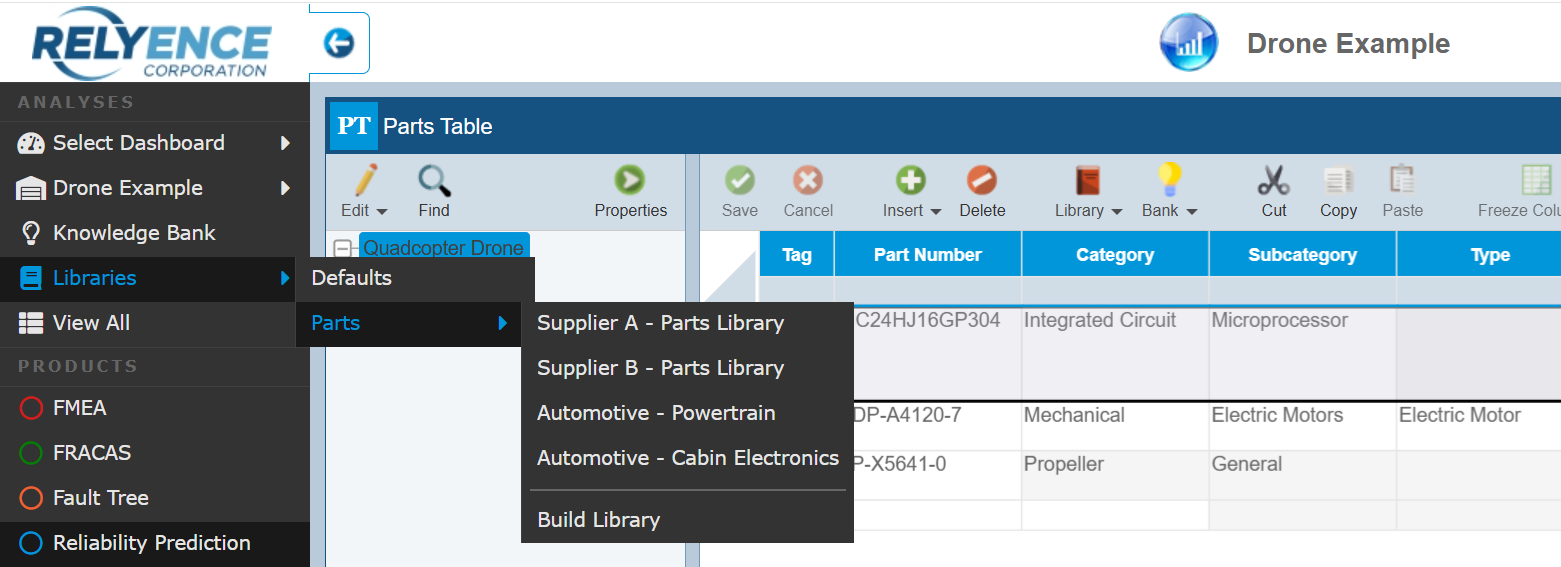
Libraries can be accessed and created by selecting the Libraries sidebar selector in Relyence Reliability Prediction.
Fault Tree: Event Quantity Can Be Specified
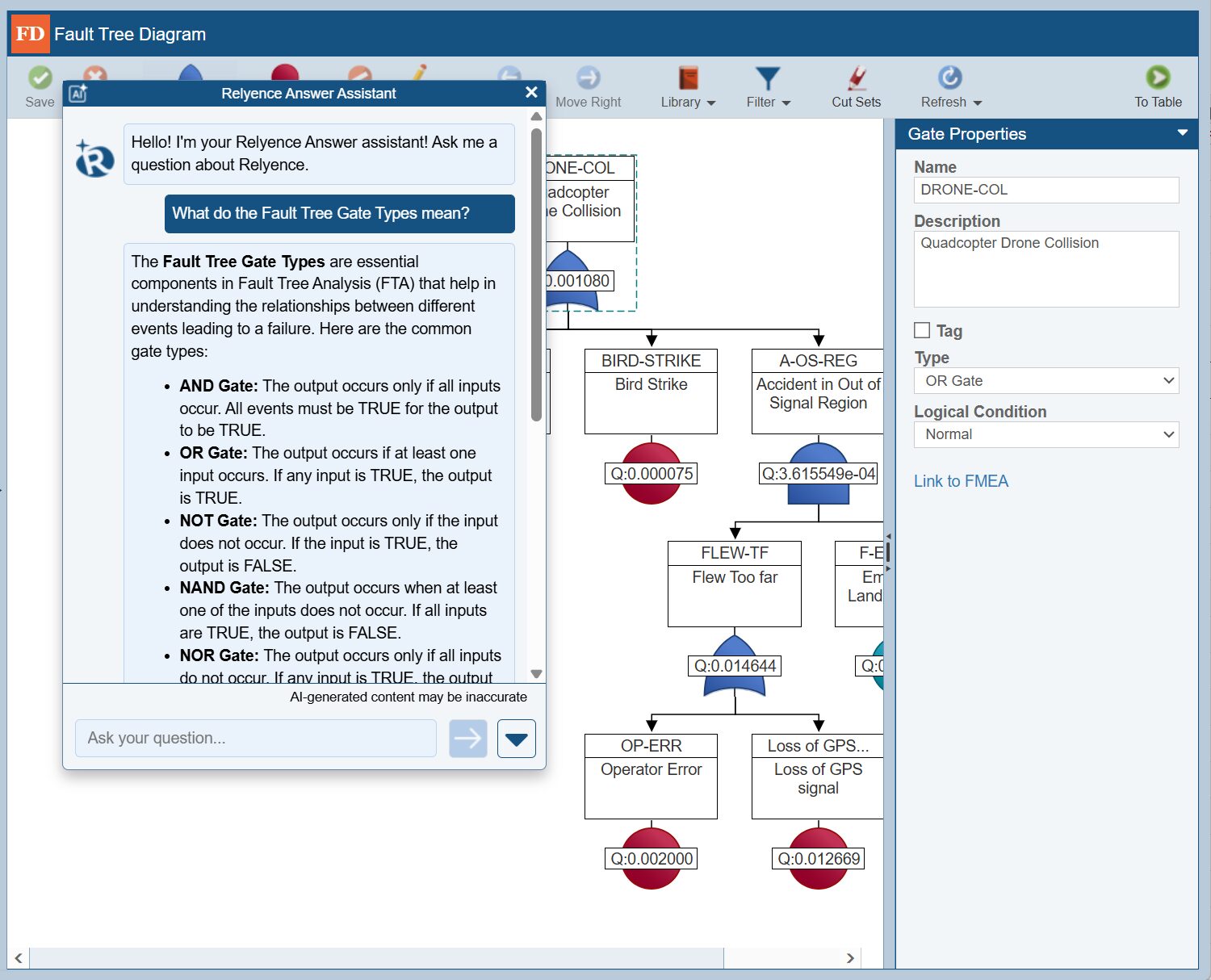
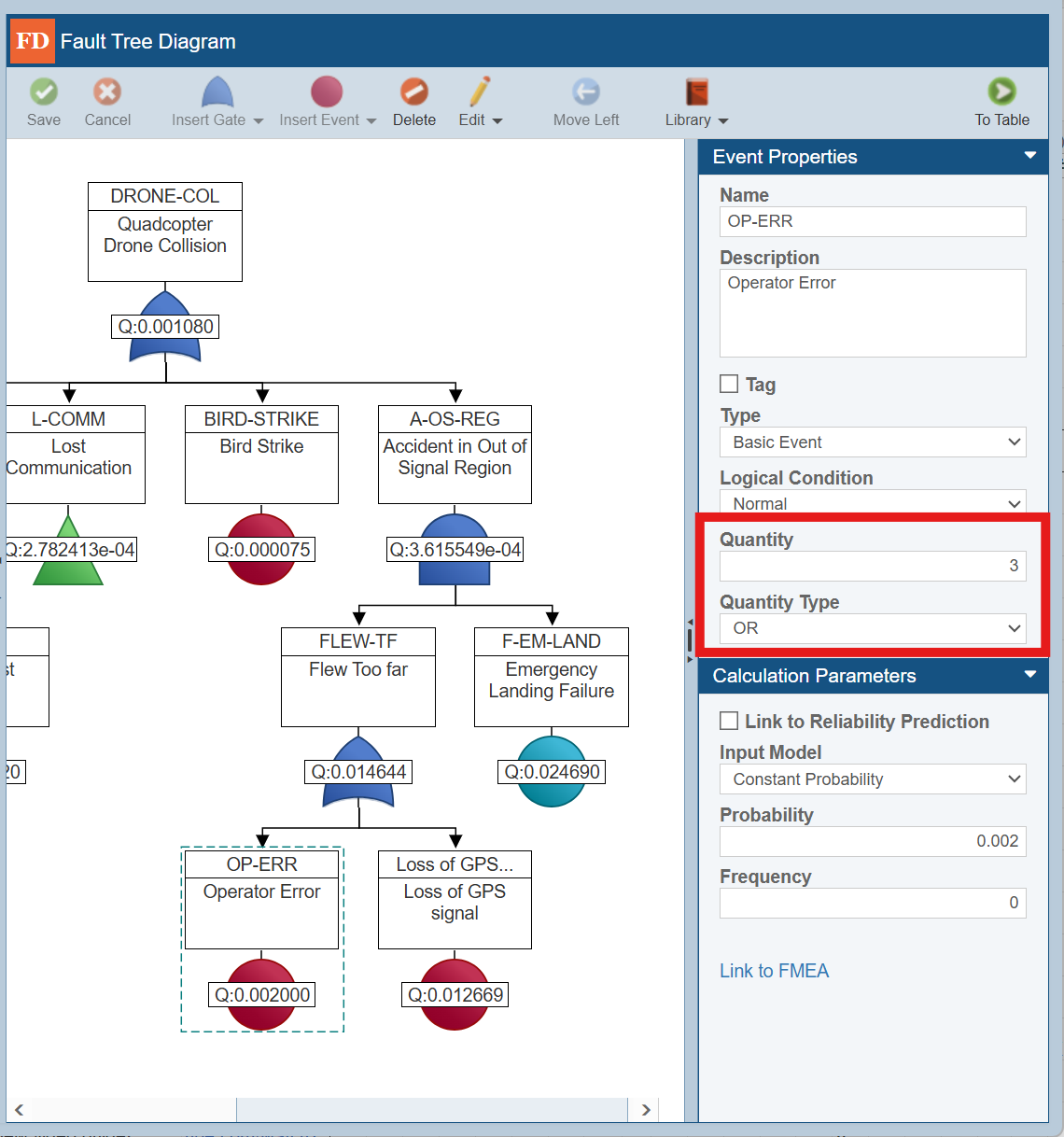
Relyence Fault Tree Analysis has been enhanced with the ability to allow Events with a Quantity greater than 1. This enables you to accurately and efficiently model scenarios where multiple identical elements contribute to top events.
When you assign a Quantity greater than 1 to an Event, the Quantity Type selector gives you the flexibility to define how those multiple Events should be modeled. In many cases, using the same logic as the Gate directly above the Event is common. For added versatility, you can also apply advanced logic types such as OR, AND, NAND, NOR, and XOR to accurately reflect a wide range of system behaviors.
Dashboards: Easily Change Analyses Across All Widgets
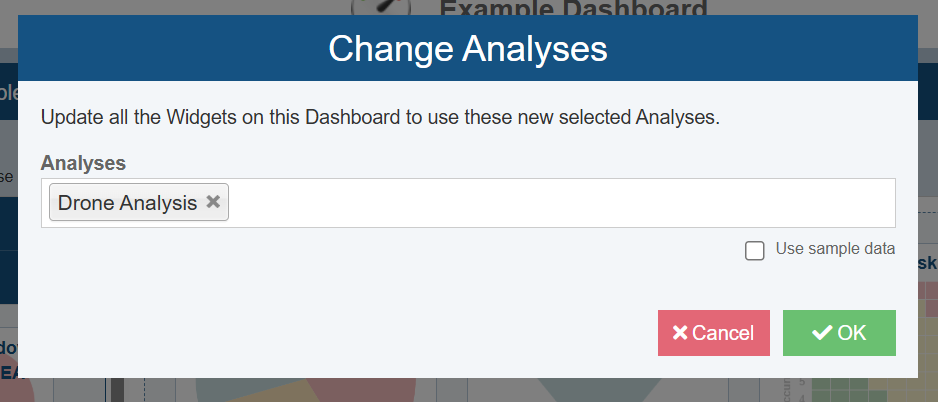
Dashboards are central to sharing insight-driven views of reliability and quality data, and now with Relyence 2026, they’re even more flexible. With this release, you can change the Analysis attached to all widgets and charts within a given Dashboard at once.
This capability allows users to repurpose Dashboards for new Analyses without rebuilding each file or compare different projects or product versions using the same visual Dashboard framework. Whether you’re reporting to leadership, tracking trends over time, or benchmarking system performance, this enhancement increases Dashboard versatility and reduces setup effort.
From a Dashboard in Relyence, select Customize in the top right corner, then choose Change Analyses from the top toolbar to access this feature.
New in Weibull Reliability Growth: Group Plots Now Available
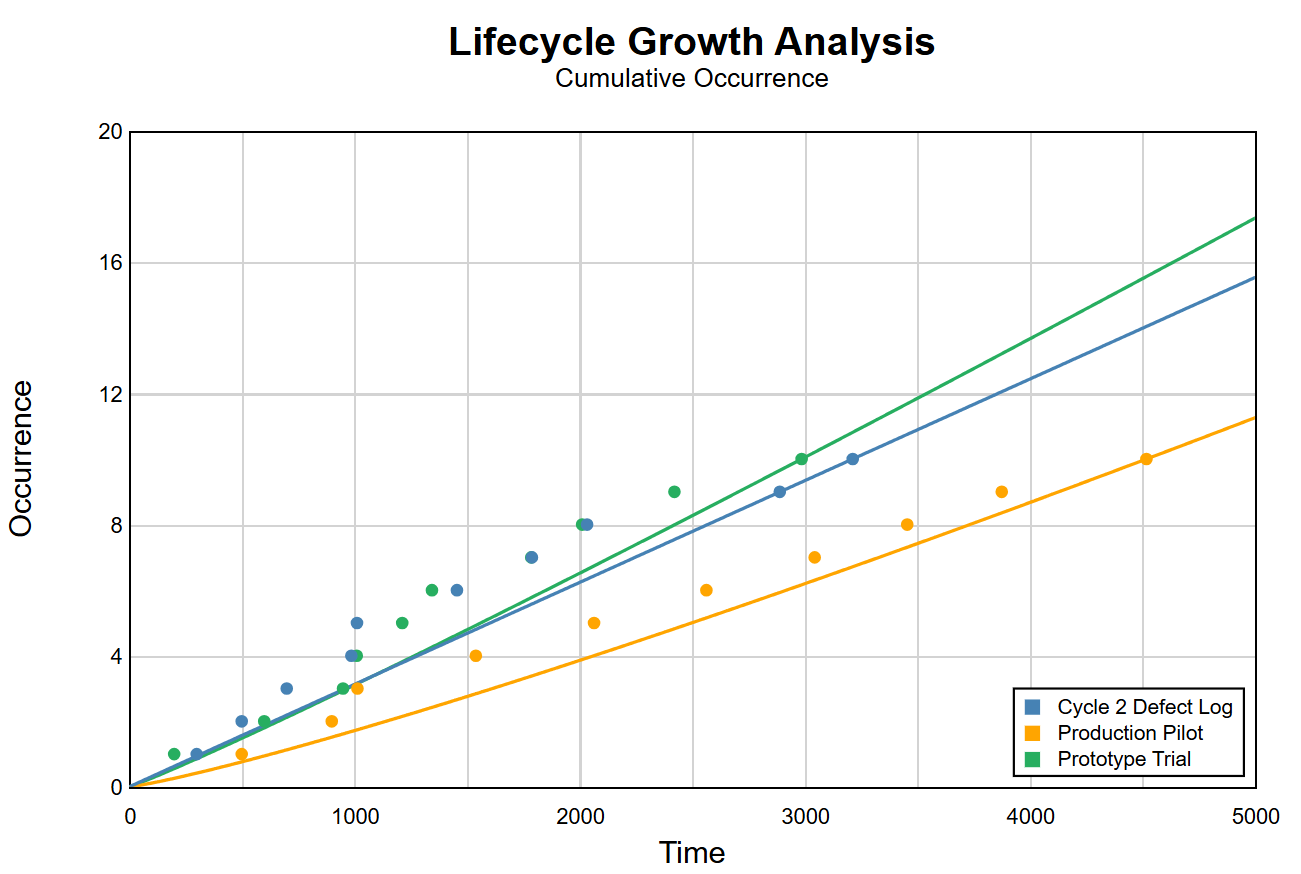
Reliability growth analysis often involves multiple test phases or design revisions. New in Relyence 2026, Group Plots in Relyence Reliability Growth allow you to overlay up to five reliability growth data sets on a single chart for direct comparison.
This makes it easy to evaluate growth trends across builds, compare subsystem performance, and assess the impact of implemented fixes over time. To create a Group Plot, select Insert > Group Plot, choose the desired Data Sets from your Analysis, select a plot type, and calculate to instantly visualize reliability growth plots side by side.
Maintainability Prediction: New Import & Export Capability
Relyence continues to enhance its Maintainability Prediction capabilities with robust Import and Export support for maintainability tasks, data, and associated libraries.
This feature enables you to:
- Export maintainability tasks and data for backup, review, or external analysis.
- Import data from Excel to populate your Maintainability Prediction libraries and tasks, which is very helpful when migrating from older tools or integrating with other systems.
- Build your Maintainability Libraries quickly and easily through import.
To import and export Maintainability data, simply select the appropriate Import or Export option from the sidebar in Relyence Maintainability Prediction.
And More!
And there’s even more that you will find in Relyence 2026, including:
- The option for “Do not force FMEA data field grouping on Worksheets” has now been extended to include DVP&Rs, Process Flow Tables, and Control Plans.
- Workflow enhancements that allow you to hide FMEA Worksheet data from users who are neither the assigned Step Responsibility nor designated as an Approver for a Step.
- FMEA Worksheet enhancements for improved data viewing.
- The ability to add non-Relyence contacts and email addresses into Workflows and Notifications to support broader collaboration beyond internal Relyence users.
- Enhanced Sign In and Sign Out Log data export capabilities.
- RBD Diagram improvements for large diagrams
Get Started with Relyence 2026
We’re proud to deliver Relyence 2026, featuring enhancements that solve critical engineering challenges while empowering teams to work more effectively and confidently.
Cloud customers can begin using these new capabilities immediately. On-Premise customers will receive the update through their normal upgrade process.
We sincerely thank you for being a valued Relyence customer! We’d love to hear your thoughts on these new features or any other ideas you may have—your feedback always helps shape future improvements.

If you’re not yet a Relyence customer, you can start your free trial today or contact us to schedule a demo and explore everything Relyence has to offer.